

GraphQL has emerged as a standout choice due to its powerful advantages in contemporary web development.
In this guide, we’ll take a closer look at Magento 2 GraphQL, highlighting its key features, comparing it with traditional API methods, and exploring its full potential in Magento 2.4.8.
Plus, a little tutorial on how you can use it in Magento 2 is waiting for you below. For this, we will take our Gift Card plugin as an example and dive deeper into queries and mutations.
But, some theory first.
What Is Magento 2 GraphQL?
GraphQL is a modern API query language and runtime that Magento 2 provides alongside its classic REST and SOAP web APIs. Originally created by Facebook, GraphQL lets clients ask for precisely the data they need – no more, no less – and get it back in a single request.
In Magento 2, GraphQL is already built into the core starting with Magento 2.3.x, and it’s used to power fast, flexible front‑ends, especially headless storefronts and Progressive Web Apps (PWAs).
Unlike older APIs where you call multiple endpoints to build a page, GraphQL lets you compose a single request that fetches all the data you need for that page in one shot. Developers control exactly which fields they want – and Magento returns nothing else.
In practice, that means GraphQL is great for:
PWA storefronts (fast mobile experiences)
Modern JavaScript apps (React, Vue, Next.js, Nuxt)
Single requests for complex pages (product lists + details + cart data)
Better performance and less data over the wire
How Magento 2 GraphQL Works
At its heart, Magento 2 GraphQL is all about asking for exactly the data you need and getting it back in one efficient round‑trip. That’s what makes it so compelling for modern Magento storefronts like PWAs and headless architectures.
Here’s the gist of how it works in Magento 2:
One smart request instead of many – When a user interacts with a page (for example, a PWA product listing or category view), GraphQL doesn’t fetch the entire database or multiple fragments. Instead, it uses a predefined schema to understand what data the client needs and returns only what you ask for.
Schema‑driven data access – Behind the scenes, Magento’s GraphQL layer uses a Schema Definition Language (SDL) that describes all available data types, fields, and relationships. When your frontend sends a query, GraphQL looks at this schema, resolves the requested fields, and pulls the required bits – possibly from different internal sources – in a single call.
Client‑centric data fetching – Because the client defines the structure of the result, you avoid over‑fetching huge objects or making multiple REST calls for related pieces of data. This leads to less bandwidth, faster responses, and a more fluid user experience, especially on mobile or PWA frontends.
Efficient performance by design – After the initial load, each interaction (like filtering products or updating a cart) can be handled with tailored GraphQL queries that only pull what’s necessary, reducing server load and speeding up page interactions.
In short, GraphQL works by resolving a well‑defined structure from the Magento backend, delivering just the requested data in a single, efficient request – which makes it ideal for fast, scalable frontends in modern e-commerce.
Key Benefits of Magento 2 GraphQL
GraphQL in Magento 2 brings real improvements to the way Magento stores fetch and serve data. Whether you’re building a headless PWA, a custom frontend, or a performance‑focused storefront, GraphQL delivers advantages that legacy APIs can’t match.
1. Fetch Only What You Need
Traditional REST endpoints often deliver more data than necessary – leading to extra load and slower responses.
With Magento 2 GraphQL, the client specifies exactly which fields it wants. Magento returns only that data, reducing payload size and improving speed. This translates into:
faster page loads,
lower bandwidth usage,
better performance on mobile and slow networks.
This precision is especially useful for product catalogs, category pages, and dynamic content rendering.
2. One Request, Multiple Data Points
In REST, building a complex page often requires multiple API calls – one for products, another for prices, another for stock, another for reviews. With Magento 2 GraphQL, you can combine everything into a single query, dramatically reducing:
number of HTTP requests,
server load,
latency.
This is a huge performance gain for PWAs and single‑page applications.
3. Better Support for Headless and PWAs
Modern frontend frameworks like React, Vue, and Next.js pair exceptionally well with GraphQL because they can orchestrate data needs declaratively. Magento 2 GraphQL API is the cornerstone of PWA Studio and other headless solutions, enabling:
instant component‑level data fetching,
flexible user experiences,
seamless frontend‑backend separation.
This makes your storefront more agile and easier to scale.
4. Strong Developer Experience
Magento 2 GraphQL’s introspection and self‑documenting schema means developers can:
explore the API in tools like GraphiQL or Insomnia,
auto‑generate types for TypeScript or IDEs,
discover available queries and mutations without external docs.
This reduces development time and accelerates debugging.
5. Reduced Over‑ and Under‑Fetching
REST APIs are prone to:
over‑fetching (data you don’t need),
under‑fetching (requiring extra calls for missing fields).
GraphQL eliminates both by letting clients tailor the response to exact data needs – keeping your responses tight and efficient.
6. Better Performance Under Real‑World Load
Because GraphQL bundles multiple data needs into a single request and minimizes redundant data, servers handle load more efficiently. Combined with Magento’s cache layers (Varnish, Redis), this approach supports higher throughput and smoother scaling.
7. Personalized and Dynamic Queries
GraphQL makes dynamic data fetching easy. You can structure queries that change based on:
store view,
customer group,
cart status,
filters and sorting.
This flexibility enables smart, context‑aware frontends without bloated custom endpoints.
8. Easier Evolution of API Without Breaking Clients
With REST, adding fields or endpoints can lead to versioning headaches.
Magento 2 GraphQL supports non‑breaking evolution: you can introduce new fields without affecting existing queries. Clients request what they need, so backward compatibility stays intact even as your API grows.
Use Cases for Magento 2 GraphQL
GraphQL is transforming the way developers build modern Magento stores. With its flexibility and efficiency, it’s particularly beneficial for headless e-commerce, PWAs, and custom frontend solutions. Let’s dive into some of the most common use cases for Magento 2 GraphQL.
Building a Headless Storefront
Headless commerce allows you to decouple the backend (Magento) from the frontend. This is where Magento 2 GraphQL really shines.
Scenario: You’re using a custom frontend built with React, Vue, or Next.js.
GraphQL Advantage: Fetch all the data you need in a single query – from product information and prices to inventory and reviews – without making multiple REST API calls.
Creating a PWA
GraphQL powers Magento PWA Studio, enabling blazing-fast, app-like experiences on the web. PWAs combine the flexibility of single-page applications with the reliability of native apps.
Scenario: You need to provide a mobile-first, fast-loading experience for your users.
GraphQL Advantage: With GraphQL, your PWA frontend can load all required data for a product, category, cart, or checkout in one efficient request, minimizing load times.
Optimizing Product Pages and Category Listings
Magento 2 GraphQL enables efficient and precise querying for product catalogs, category listings, and detailed product information.
Scenario: You want to display product lists, detailed product information, and customer reviews on your category pages.
GraphQL Advantage: Retrieve specific fields such as product names, prices, images, stock statuses, reviews, and more in one call to reduce server load and avoid over-fetching.
Managing Cart and Checkout Interactions
Magento 2 GraphQL excels at real-time interactions like adding products to the cart, updating quantities, or applying promo codes.
Scenario: Your store needs to display an up-to-date cart, including items, prices, totals, and discounts, right on the page.
GraphQL Advantage: Send a single mutation query to add items to the cart, apply coupon codes, or update item quantities – all while keeping the cart’s total and other details synchronized.
Managing Customer Accounts and Authentication
GraphQL provides a more streamlined method for handling customer registration, login, and account management.
Scenario: Customers need to register, log in, or update their account information.
GraphQL Advantage: Use mutations to handle account creation, login, password updates, and more. GraphQL's flexibility allows for tailored interactions based on customer status or other variables.
Fetching Dynamic Content Based on Filters and Sorting
Magento stores often have layered navigation filters (e.g., price range, size, color) that refine product lists. Magento 2 GraphQL makes this super efficient.
Scenario: You want customers to be able to filter products based on color, price, or brand, while keeping the page fast and responsive.
GraphQL Advantage: Retrieve filtered product lists dynamically, using variables in the query to adjust the data based on selected filters or sort options, without reloading the entire page.
Implementing Real-Time Stock Updates
Keeping product stock data current in real-time can be challenging, especially for large inventories.
Scenario: A product’s stock status needs to update dynamically when a customer adds it to the cart or completes a purchase.
GraphQL Advantage: Queries return the latest stock levels, ensuring customers always see up-to-date availability without needing to refresh the page.
Optimizing Search Results and Recommendations
Magento 2 GraphQL is highly effective when you need a fast and efficient search function with product recommendations.
Scenario: You want a powerful search engine that instantly returns product results based on keywords, filters, and categories.
GraphQL Advantage: You can query not only for search results but also for related products or up-sell recommendations in a single query.
Magento 2 GraphQL Tutorial with GiftCardGraphQL
GiftCardGraphQL includes 1 query and 3 mutations.
The query has the name amGiftCardAccount and is responsible for the information about the gift-card product:

The addAmGiftCardProductsToCart mutation adds a gift-card product to the cart.
The applyAmGiftCardToCart mutation applies the code to the cart:

To remove the gift card code from the cart, use the removeAmGiftCardFromCart mutation:
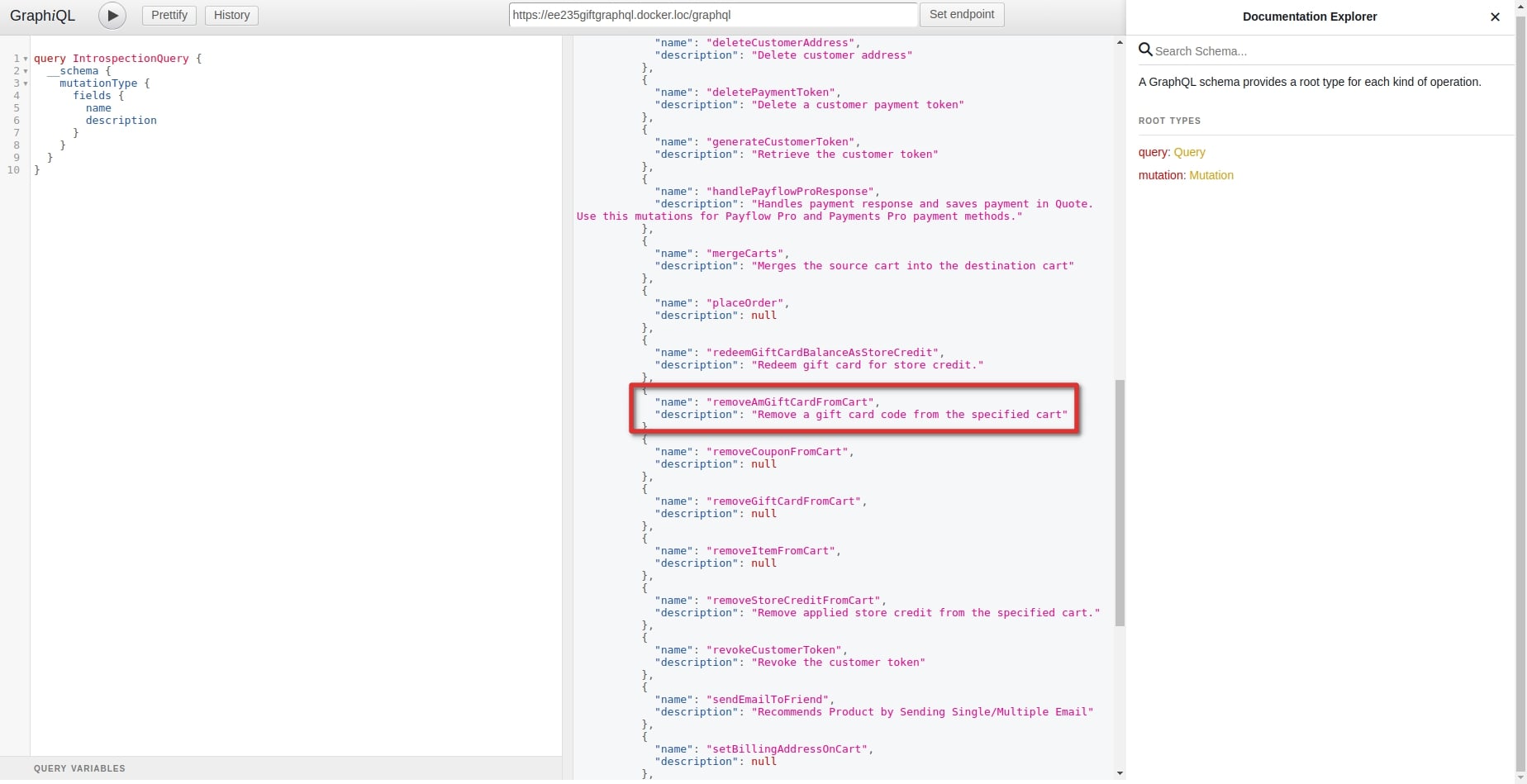
Let’s consider them specifically.
The amGiftCardAccount query
As we mentioned above, the amGiftCardAccount query allows you to get information about the gift card by its unique code. To create a request, we need to know the gift card code. You can get it in the Magento backend. For this, go to Marketing > Gift Cards > Accounts and copy the needed Gift Card Code:

Now, you can make a request:

In the first column, you can see our request. We formed it from the options that are available for this query. Hereafter, the full list of the available fields is displayed in the 3rd column.
As a result, we got a response in the middle column. You can compare the received data with the information in the admin panel. They are the same.
Mutations
applyAmGiftCardToCart / removeAmGiftCardFromCart
To apply or remove the gift card in the cart, you can use mutations applyAmGiftCardToCart and removeAmGiftCardFromCart correspondingly.
Before making a request, you need to get a cart ID via the createEmptyCart mutation:

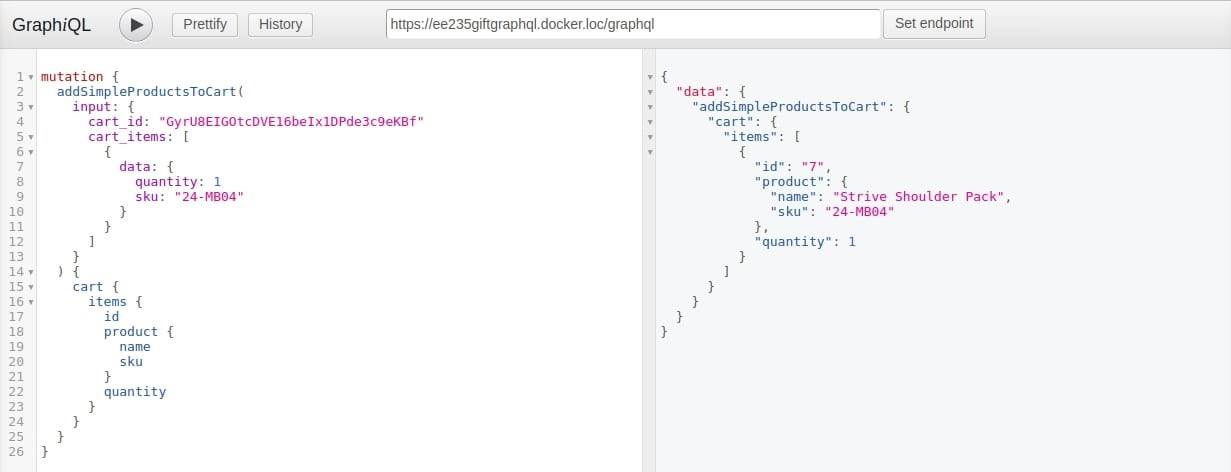
Then, add products to the cart, by using the received ID, product SKU, and quantity:

The product is added to the cart:
Now, you can use our applyAmGiftCardToCart mutation. For this, you need the cart ID received from the createEmptyCart mutation and the gift card code:
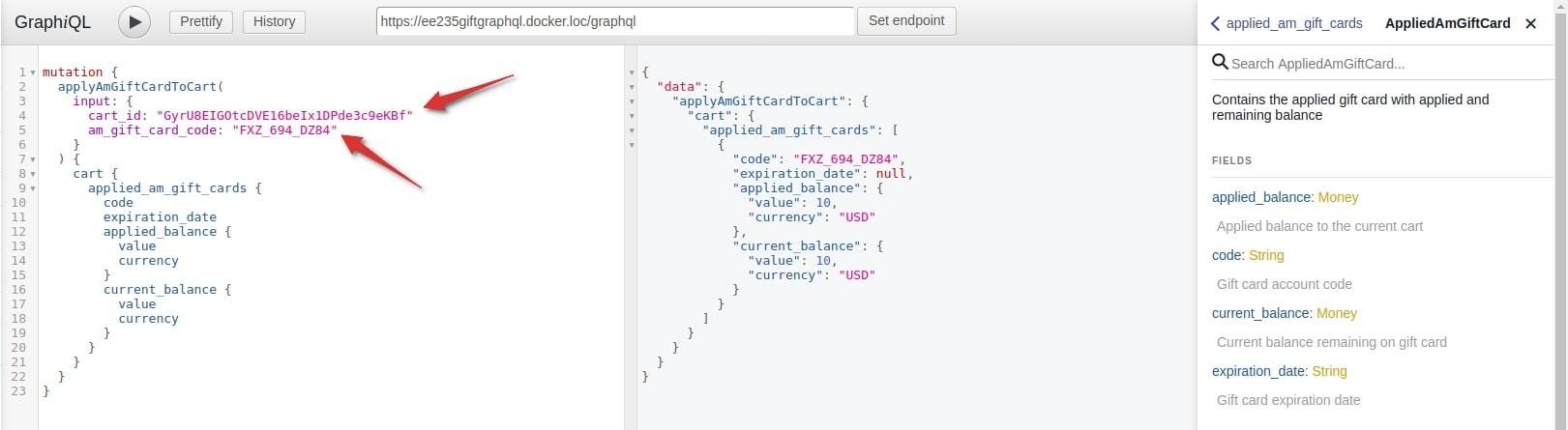
In this screenshot, you can see our request, respond, and the full list of the applyAmGiftCardToCart mutation options.
The applied_am_gift_cards option includes full information about applied gift codes to the cart. You can use it in any requests that are related to the cart.
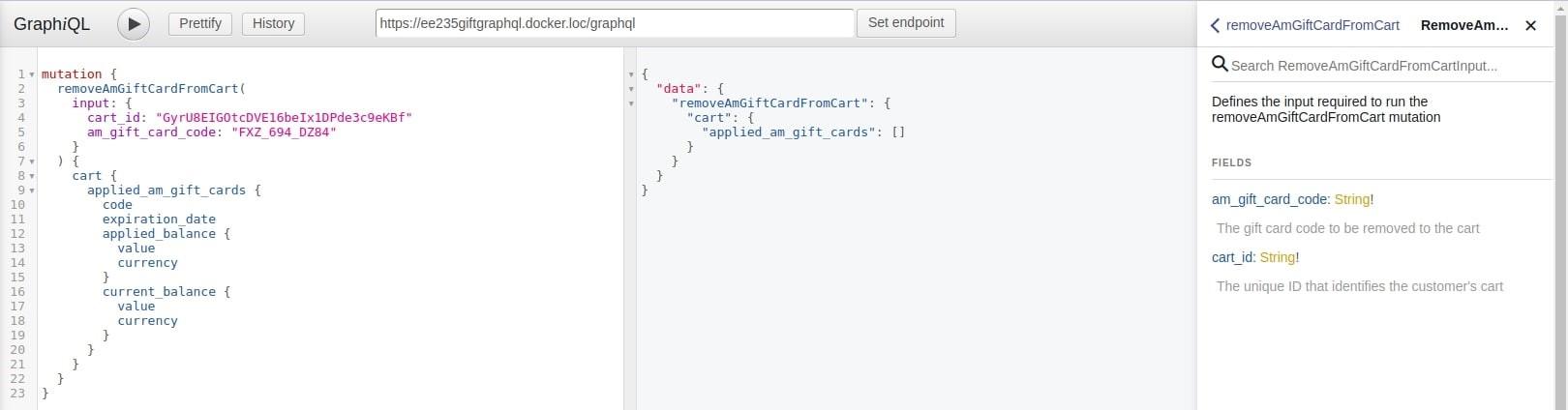
To reset the gift card, use a similar request with removeAmGiftCardFromCart:
addAmGiftCardProductsToCart
The addAmGiftCardProductsToCart is used to add a gift-card product to the cart.
Before making the request, you need to create a new gift card product in your Magento 2 backend. You can check out how to do this in our tutorial.
Go to Products > Catalog, click Add Product, and choose Gift Card Pro from the dropdown. Then, choose the Card Type, Gift Card Code Pool, and Gift Card Image:

Fill in product details:

Set prices:

And check the result on the frontend:

Next, get a cart ID via the createEmptyCart mutation, exactly how we did it earlier:

To add the gift-card product, you need not only the cart ID, product SKU, and quantity but also gift_card_options. This block is required and consists of gift card options that you can find in the 3rd column.
To get the list of chosen options, you need to use the … onAmGiftCardCartItem block. In the am_giftcard_options, you can specify for output code, label, and value of each option.

Other examples of the gift card use
The gift card product is available for all product requests. For example, let’s try to make a search request with our created gift card product. To display the gift-card product properties, you can use the … onAmGiftCardProduct block. Here is how it looks like:
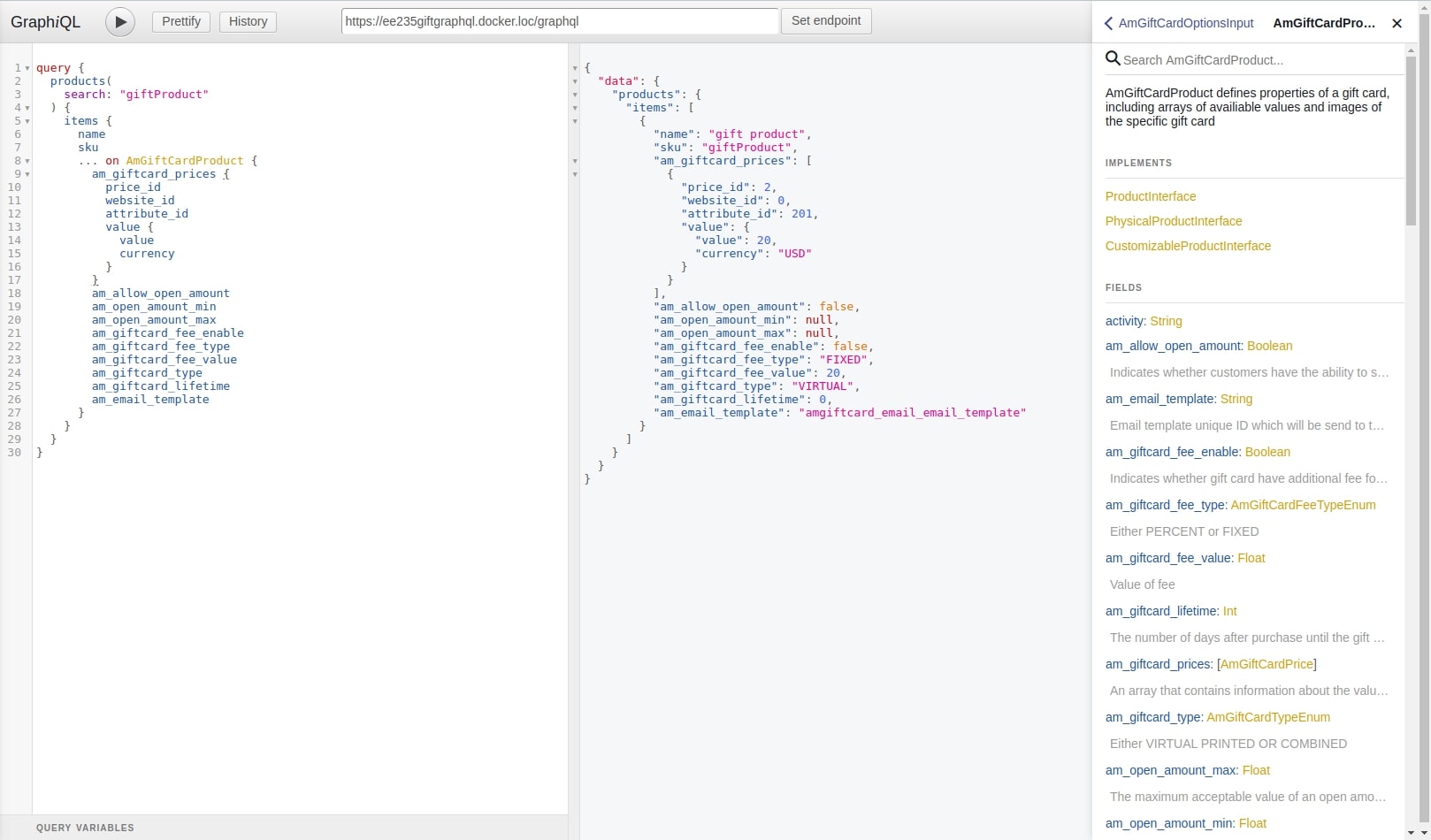
All the available options are listed in the 3rd column.
Hopefully, you now have a clearer idea of how to use GraphQL in Magento 2. But if you have any questions, feel free to comment below. We’ll do our best to help you out!
Frequently Asked Questions
To use Magento 2 GraphQL, you need to follow these steps:
Enable GraphQL: In Magento 2, GraphQL is available by default in the system. Make sure it is enabled by going to Stores > Configuration > Services > Magento GraphQL and check if it's active.
Access the GraphQL Endpoint: The endpoint for GraphQL in Magento 2 is located at your-domain/graphql.
Send Queries: You can send GraphQL queries using tools like Postman or Insomnia, or directly from the front end using JavaScript.
Handle Responses: The responses will be in JSON format, which you can process and display as needed.
GraphQL is used to interact with a backend service in a flexible and efficient manner. It allows you to:
Retrieve Specific Data: Unlike traditional REST APIs, GraphQL allows you to fetch only the data you need, avoiding over-fetching and under-fetching of data.
Single Request: You can query multiple resources in one request, which improves performance by reducing the number of API calls needed.
Efficient Updates: It supports real-time updates via subscriptions, useful in e-commerce for real-time product inventory and order updates.
Data Fetching
GraphQL: Allows you to specify exactly which data you want, thus reducing unnecessary data transmission. It’s a more flexible and client-driven approach.
REST API: Follows fixed data structures and typically requires multiple requests to get different resources (i.e., a product’s information and reviews would require separate requests).
Response Format
GraphQL: Returns only the fields requested, providing a more streamlined response.
REST API: Returns standard, fixed data, which may include unnecessary fields.
Over-fetching and Under-fetching
GraphQL: Prevents over-fetching and under-fetching by allowing clients to query exactly what they need.
REST API: Sometimes leads to over-fetching (when you request more data than you need) or under-fetching (when you need additional data but must make another request).
Create a Custom Module
You need to create a custom module to add GraphQL queries, mutations, and schema.
Steps:
Create a new module with app/code/[Vendor]/[Module].
Define a GraphQL Schema: Create a schema.graphqls file inside your module, where you define your queries and mutations.
Create a Resolver: A resolver is a PHP class that implements the logic for fetching or modifying data.
Register the Schema: Register the GraphQL schema by adding the necessary di.xml and etc/graphqls/ files.
Test the API: Once the GraphQL schema is registered, you can test your new GraphQL API by making queries via your-domain/graphql.
The above creates a query customProduct which takes an id and returns product details, resolving the data with a custom resolver.

